Introduction to OpenShift Installation and Configuration
OpenShift installation and configuration helps organizations deploy applications faster while reducing infrastructure complexity. Today, teams need platforms that support scalability, security, and automation. Because of this, OpenShift has become a preferred Kubernetes-based PaaS for enterprises and DevOps teams.
Built by Red Hat, OpenShift simplifies container orchestration, application lifecycle management, and hybrid cloud operations. At the same time, it enables developers to focus on code instead of infrastructure management.

What Is OpenShift?
OpenShift is a family of container platforms developed by Red Hat. It is built on Kubernetes, Docker, and Red Hat Enterprise Linux. As a result, it delivers a stable and secure platform for modern applications.
OpenShift includes multiple offerings to suit different deployment models:
- OKD – Community-driven upstream distribution
- OpenShift Container Platform – Self-managed enterprise platform
- OpenShift Online – SaaS-based OpenShift
- OpenShift Dedicated – Fully managed service on public cloud
According to Red Hat’s official documentation, OpenShift extends Kubernetes with enterprise-grade security, networking, and developer tooling, making it production-ready at scale.
Understanding PaaS in OpenShift Installation and Configuration
Platform as a Service (PaaS) provides a complete environment for building, deploying, and managing applications. Unlike traditional infrastructure models, PaaS removes the burden of managing servers, middleware, and runtime dependencies.
Because of this, OpenShift PaaS accelerates application delivery by:
- Automating builds, deployments, and scaling
- Enabling self-service for developers
- Supporting the full application lifecycle
For example, developers can push code directly from Git, while OpenShift handles container builds and deployments automatically.
Why OpenShift for Modern Enterprises?
OpenShift installation and configuration delivers clear advantages for both developers and operations teams.
First, it supports hybrid and multi-cloud deployments. Therefore, applications can run consistently across on-premises and cloud environments.
Second, OpenShift improves security from the operating system to the application layer. As a result, teams can meet enterprise compliance requirements more easily.
Finally, OpenShift shortens development cycles. Organizations using OpenShift often release features faster with improved software quality.
OpenShift Architecture Overview
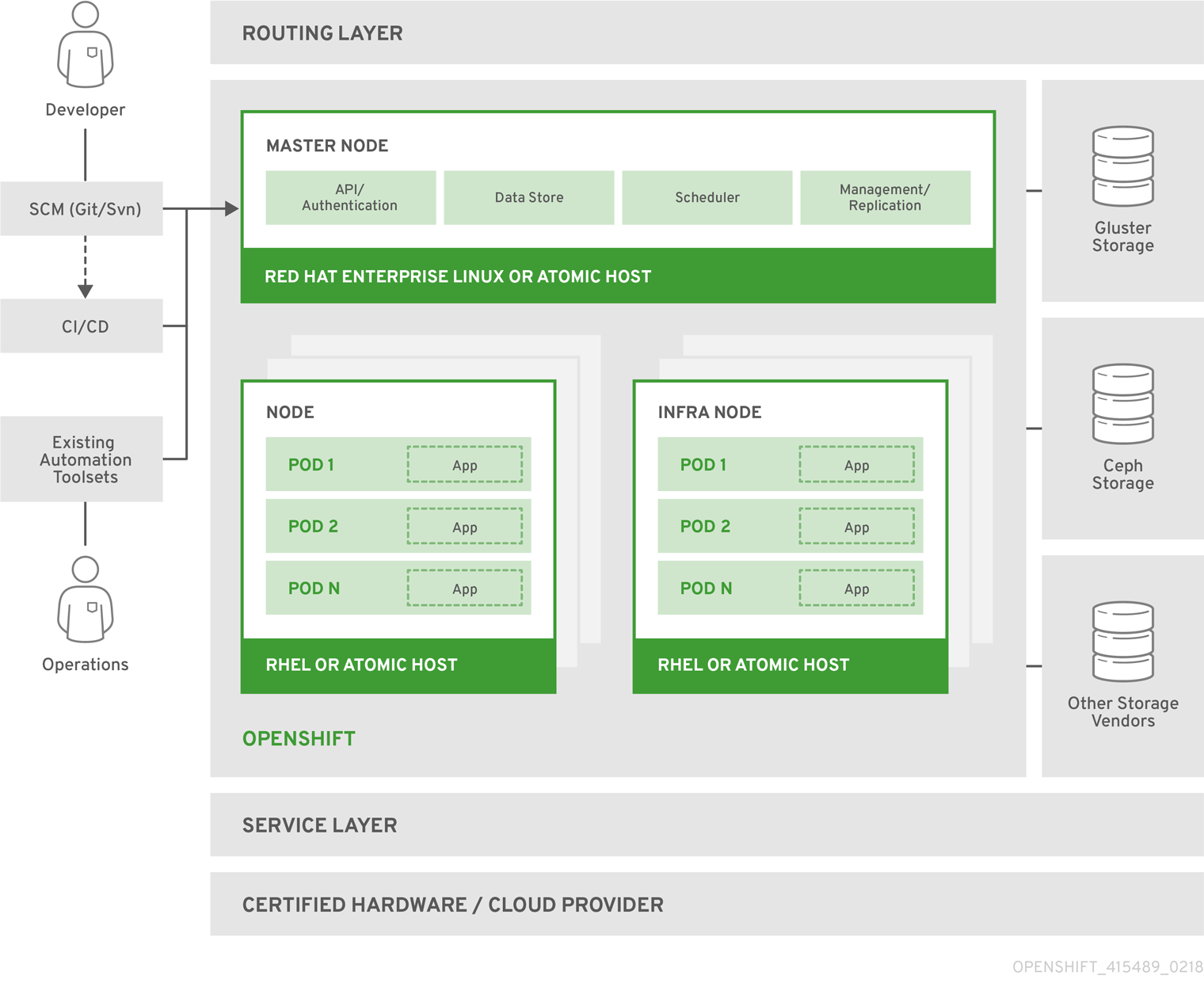

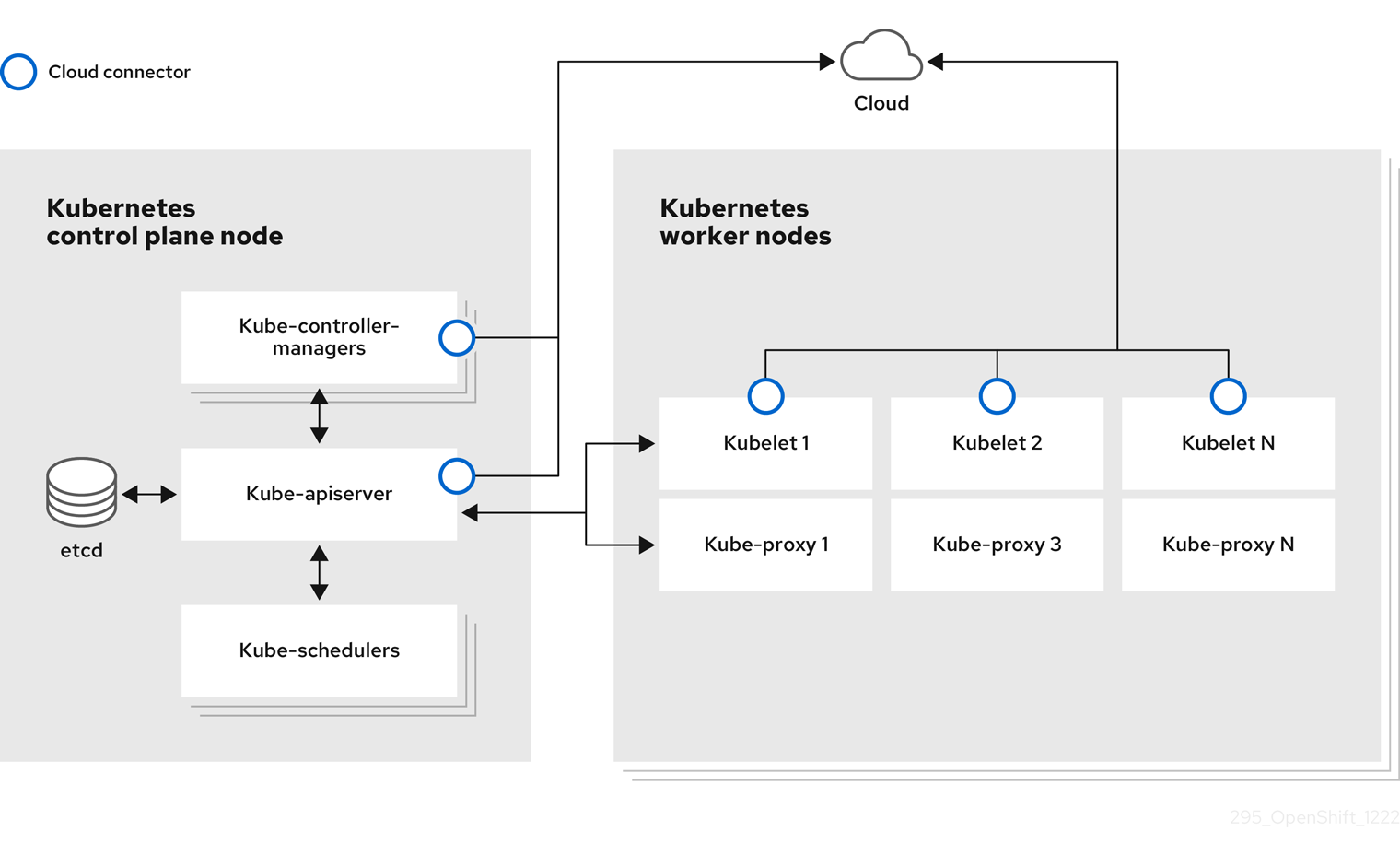
A typical OpenShift architecture includes:
- Master nodes for cluster control and scheduling
- Worker nodes for running application pods
- etcd for configuration and state management
- HAProxy and routing layer for traffic management
Because of this layered architecture, OpenShift scales efficiently while maintaining high availability.
Types of OpenShift Releases
OKD (OpenShift Origin)
OKD is the upstream community distribution that powers Red Hat OpenShift. It is ideal for experimentation, learning, and open-source environments.
OpenShift Container Platform
This is the enterprise-grade, self-managed OpenShift offering. It runs on your own infrastructure and supports both cloud-native and traditional workloads.
OpenShift Online
OpenShift Online provides on-demand access to OpenShift as a hosted service. Therefore, teams can build and deploy applications without managing the underlying infrastructure.
OpenShift Dedicated
OpenShift Dedicated offers a fully managed OpenShift cluster hosted on AWS or Google Cloud. As a result, enterprises get high availability with minimal operational overhead.
OpenShift Installation and Configuration Using OKD
Prerequisites for OpenShift Installation and Configuration
Before starting, ensure the following setup:
Master Node
- CentOS 7 / RHEL 7 (Minimal installation)
- Minimum 4 vCPU
- Minimum 8 GB RAM
Worker Node
- CentOS 7 / RHEL 7 (Minimal installation)
- Minimum 4 vCPU
- Minimum 8 GB RAM
In addition, ensure stable network connectivity and proper hostname resolution.
Preparing Systems for OpenShift Installation
Update all packages on both master and node systems. After that, configure hostnames and update /etc/hosts for proper communication.
Next, verify that the running kernel matches the installed kernel. If not, reboot the systems to avoid deployment issues.
Installing Required Packages
Install essential packages such as Docker, NetworkManager, development tools, and Python dependencies. Because OpenShift relies heavily on automation, these components are mandatory for a smooth installation.
Enable and start Docker and NetworkManager services on all nodes before proceeding.
Ansible-Based OpenShift Installation and Configuration
OpenShift uses Ansible playbooks for automated deployment. For OpenShift 3.x, Ansible version 2.6.x is recommended to avoid compatibility issues.
Clone the official OpenShift-Ansible repository and switch to the required release branch. Then, configure passwordless SSH between master and nodes.
Inventory File Configuration
The inventory file defines cluster roles, nodes, and deployment parameters. Therefore, accuracy is critical at this stage.
Configure:
- Master, node, and etcd groups
- Network plugin settings
- OpenShift version details
Once completed, validate permissions and proceed with the playbooks.
Running OpenShift Playbooks
First, execute the prerequisites playbook. After successful completion, deploy the cluster using the main deployment playbook.
Once finished, OpenShift installation and configuration is complete, and the cluster becomes accessible via the web console.
Accessing the OpenShift Web Console
The OpenShift console runs on port 8443. However, users must be created before logging in.
Create users using htpasswd, then log in to the console using the configured credentials. As a result, administrators can manage projects, users, and workloads from a centralized UI.
Deploying Applications on OpenShift
OpenShift supports multiple programming languages and frameworks. For example:
- PHP
- Python
- Node.js
- Ruby
- .NET
Applications can be deployed directly from Git repositories using Source-to-Image (S2I). Consequently, builds and deployments become faster and more reliable.
How ZippyOPS Enhances OpenShift Success
Successful OpenShift installation and configuration requires more than setup. It demands ongoing optimization, security, and automation.
ZippyOPS provides consulting, implementation, and managed services across DevOps, DevSecOps, DataOps, Cloud, Infrastructure, and Security. Moreover, ZippyOPS helps enterprises design scalable OpenShift platforms aligned with business goals.
Through services in Automated Ops, AIOps, MLOps, and Microservices, ZippyOPS ensures continuous improvement and operational excellence. Learn more about their offerings at:
In addition, practical OpenShift tutorials and demos are available on the ZippyOPS YouTube channel:
https://www.youtube.com/@zippyops8329
Conclusion
OpenShift installation and configuration enables organizations to adopt Kubernetes with confidence. It simplifies application deployment, improves security, and supports hybrid cloud strategies.
In summary, when combined with expert guidance from ZippyOPS, OpenShift becomes a powerful foundation for modern, scalable, and secure application platforms.
For enterprise OpenShift consulting and managed services, contact:
[email protected]